Desktop Application · Internal Operations
Founder note outcomeEmployee OS
Employee OS is a Kraftt Digital Windows desktop product created to connect routine employee, attendance and payroll work while keeping operational employee data on the customer’s computer.
- Engagement
- Product strategy · UX/UI design · Electron desktop development · Payroll workflow engineering · PDF and Excel reporting · Local data and backup architecture
 View the project ↓
Desktop platform
Built for Windows 10 and Windows 11, 64-bit computers.
Normal operation
Employee, attendance and payroll workflows continue without an internet connection after installation.
Connected workflows
Employee records, attendance, overtime, payroll, salary slips, reports and backup management.
Operational data
Operational employee data remains on the customer’s computer.
Inside the work
Gap → research → systemFrom business gap
to working system.
See the context, research and delivered work. Outcome claims are limited to the evidence available for this project.
Business brief
What needed to change
Employee records, monthly attendance, payroll calculations, salary slips and backups often live in separate registers, files and spreadsheets that are difficult to review as one operating workflow.
Employee OS is a Kraftt Digital Windows desktop product created to connect routine employee, attendance and payroll work while keeping operational employee data on the customer’s computer.
Audit findings
What the research exposed
- 01
Routine employee information needs one structured source
↳ - 02
Attendance and approved overtime must feed a reviewable payroll workflow
↳ - 03
Finalized salary records need stable PDF and Excel outputs
↳ - 04
Local operations require a clear backup and restore path
↳
Comparison set
Who shaped the benchmark
Used as a research landscape—not as a design template.
Kraftt system
What we built and why
Profiles, managed documents, employment details and routine record administration in one Windows workspace.
A keyboard-friendly register for attendance exceptions, paid days and approved overtime.
Draft calculation, review, report download and finalization are separated into visible stages.
Generate salary slips plus readable PDF and Excel reports from stored payroll records.
Portable local backups move the database, managed documents and company assets together.
Normal operational work stays on the installed computer instead of relying on a cloud employee database.
Project gallery
04Delivered surfaces.
Supporting detail.
Selected screens and implementation details from the finished system.
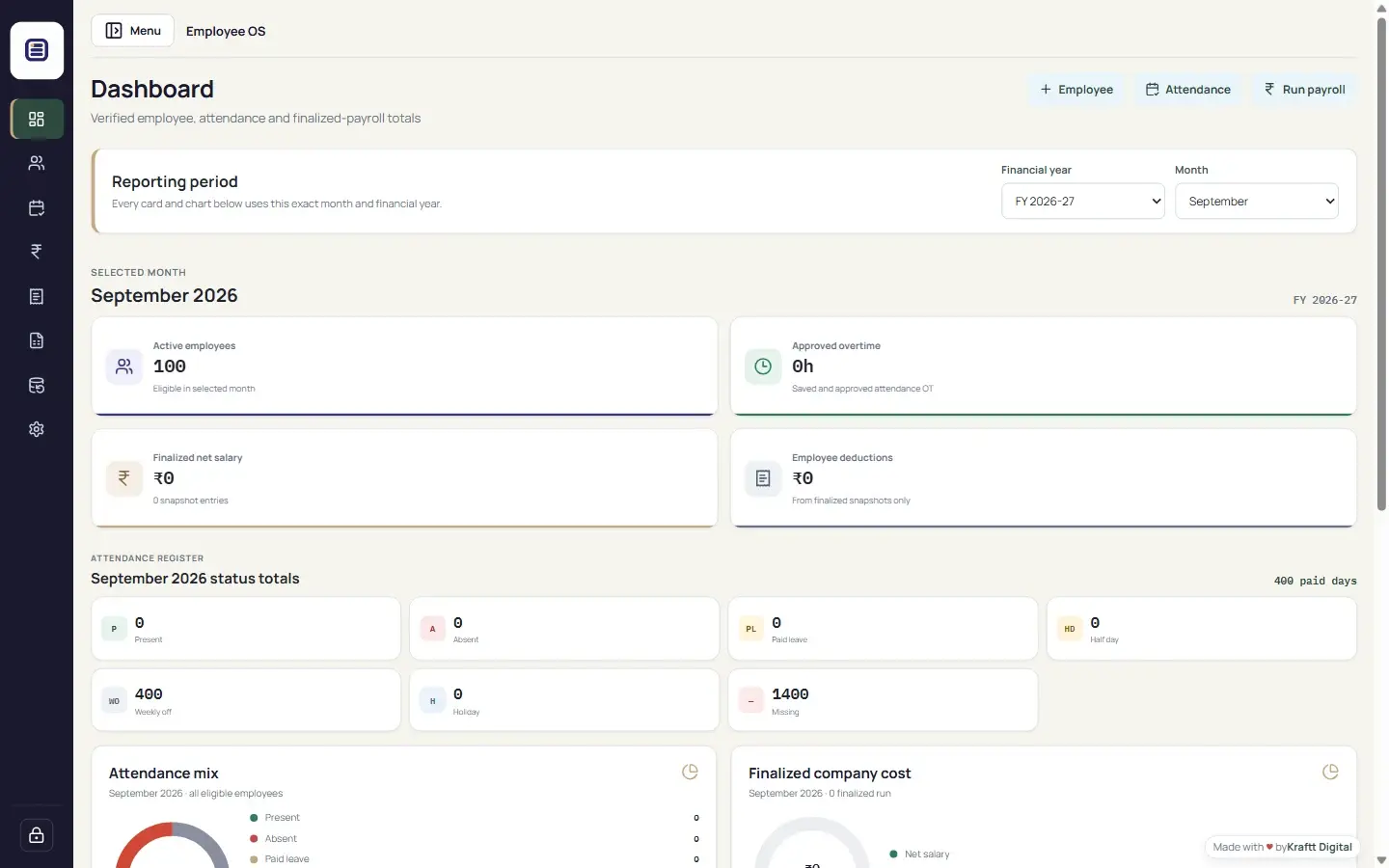
Employee OS employee records screen using clearly labelled test employee data
The employee workspace keeps profiles, employment information, managed documents and routine actions together. Every visible record in this screen is clearly labelled test data.
Drag, swipe or use arrow keys to explore.
Desktop platform
Founder note outcomeWhat changed
A released Windows desktop product that connects employee records, attendance, payroll, salary slips, reports and local backups in one operational workspace.
Evidence noteThis is a Kraftt Digital product rather than a client engagement. The secure download and current release information are maintained on the dedicated Employee OS website.
Founder note
Employee OS is a Kraftt Digital product. This project documents product strategy and delivery, not a client testimonial or third-party endorsement.
Free introductory call
Turn what the market sees into a clearer business case.
Tell us what you need. We’ll discuss the fit, the likely scope and a sensible starting point.
Request a Free Introductory Call